

Why bring your own LLM
Requirements
Your endpoint must implement the OpenAI Chat Completions specification:- Endpoint:
POST /chat/completions - Payload: accepts a
messages: []array - Streaming: Server-Sent Events (SSE) with
data:framing
- Function calling: needed if the agent uses tools
- Vision: needed for multimodal inputs
Configure via the Developer Portal
1
Open your agent
Navigate to Create New Agent or an existing agent in app.trugen.ai.
2
Open Agent Config
Find the LLM section.
3
Select Bring Your Own LLM
In the Provider dropdown, select Bring your own LLM.
4
Enter your endpoint
Provide your API URL, Model Name, and API Token. Save.
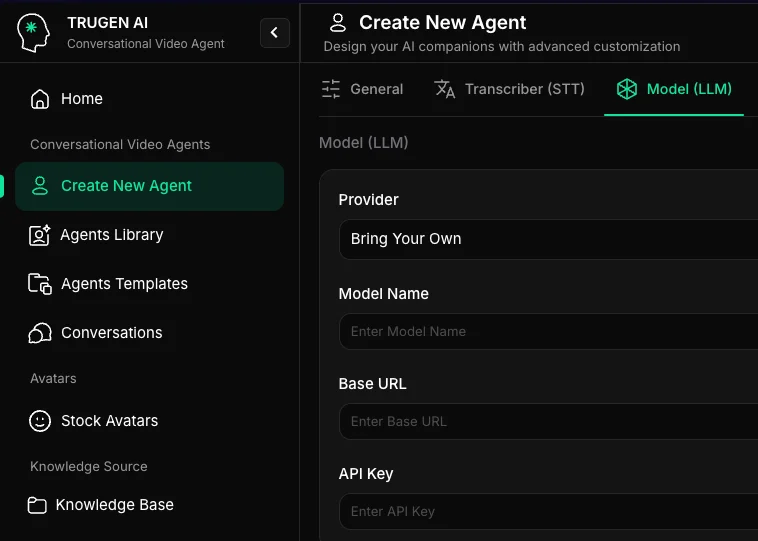
Developer Portal: Custom LLM configuration
Configure via API
Set the LLM config’sprovider to "custom":
Endpoint contract
Your/chat/completions handler receives:
Keep-alive during long generations
Long generations without any output can trigger idle timeouts. Emit a comment line every 10 seconds:Function calling
If your endpoint supports OpenAI-style function calling, return tool calls in the delta:messages[].role: "tool" turn, and continues generation.
Fallback to a hosted model
If your custom endpoint errors or times out, TruGen can fall back to a hosted model automatically:Latency expectations
Custom LLMs add network round-trip time between TruGen’s infrastructure and yours. Aim for:- Time to first token: under 500 ms
- Endpoint region: as close to your TruGen region as possible
- Network latency to TruGen edge: under 50 ms
What’s next
Available LLMs
Compare hosted providers if BYO isn’t a hard requirement.
Prompting strategies
Write prompts that work well for real-time voice.
Tools
Enable function calling on your custom LLM.